
Description
Give every return request a clear next step
A customer wants to return one item, but the details are scattered across emails. Give signed-in customers a clear place to request eligible quantities from their own completed orders, and give your team one place to record a decision.

Inside Booster
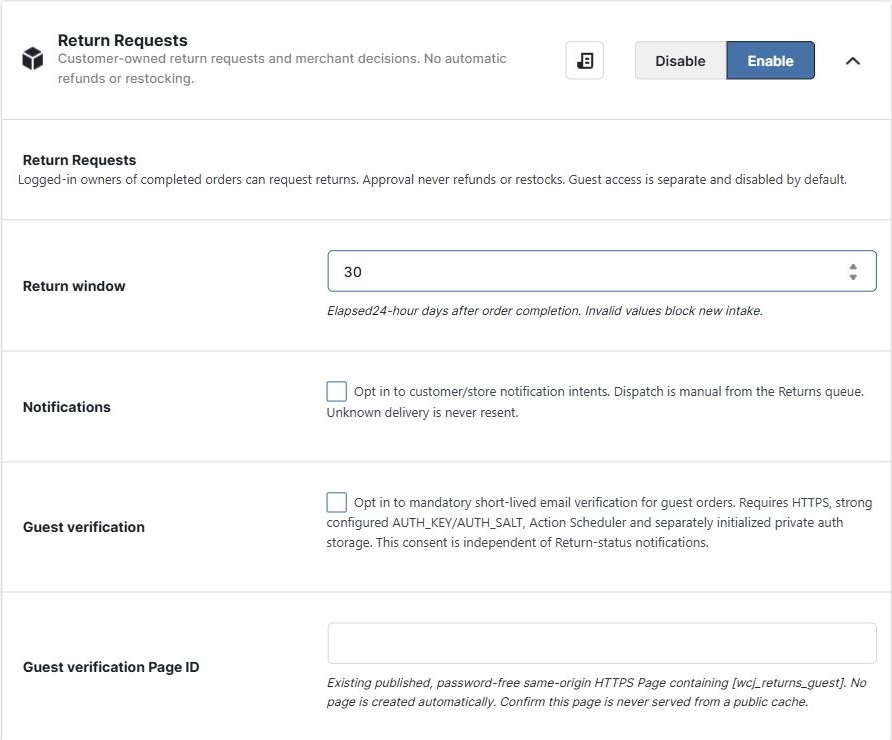
A clearer return conversation in three steps
Set your policy.
Turn on Return Requests, initialize its private storage and choose the store-wide return window.
Review the request.
The customer chooses eligible items and quantities from their completed order in My Account. Review the request in WooCommerce > Return Requests.
Record your decision.
The customer can follow the request history and see your decision there. Arrange any parcel handling or refund separately.
Approval records a decision. It does not refund money, restock products or process a payment.
Choose your edition
Useful basics in Free and Plus. Advanced tools where you need them.
Basic Returns
Customer requests, history and merchant decisions. One store-wide return window. Verified guests after separate setup.
Basic Returns
The same basic Returns workflow for existing Plus customers, including the bounded Returns Summary.
Advanced Returns
Item-specific windows and exclusions, status/order filters and current-page queue reports, alongside the basic workflow.
What is included in each edition?
| Capability | Free | Plus | Elite |
|---|---|---|---|
| Signed-in customer requests, history and merchant decisions | Included | Included | Included |
| Store-wide return window | Included | Included | Included |
| Verified guest access, after separate setup | Included | Included | Included |
| Product, variation and category windows or exclusions | Not included | Not included | Included |
| Status and exact order ID queue filters; current-page age and reason counts | Not included | Not included | Included |
| Read-only Returns Summary | Latest up to 50 requests | Latest up to 50 requests | Same bounded sample, also used in Morning Store Briefing |
Know what the workflow does
- Signed-in access is limited to the customer’s own eligible completed orders. Guest access is a separate verified flow, not an anonymous return form.
- Only accounts allowed to manage WooCommerce can open the Return Requests queue and summary.
- Changed order facts can put the whole order on a Needs review hold. An unavailable result is not an empty queue, and an uncertain operation must not be blindly retried.
- Notifications are separately enabled and manually dispatched. Seeing a decision in request history does not mean an email was automatically sent.
- Elite reports cover the current queue page. Returns Summary covers the latest up to 50 request IDs. Neither is a whole-store trend report.
Start with the account workflow
Choose a return window, initialize storage and test with an eligible completed staging order. Add guest verification only when HTTPS, a private verification page, email and authentication prerequisites are ready.
Set up Return Requests step by step
Want a quick overview rather than an individual request? Explore Returns Summary and rule explanations.
- Free
- Plus and Elite
- with the edition differences listed below
 WooCommerce 11.0.1 and
 WordPress 7.0.6